
Good lesson time management means three things: spending less time preparing and on admin, keeping each class moving at the right pace, and giving feedback without losing your evenings. Most advice only covers the middle part. This guide covers all three, with a focus on language teachers who run online, in-person or hybrid classes.
The approach is simple. Decide what deserves your time, cut or automate the rest, and build a short routine around the lesson: before, during and after.
TL;DR
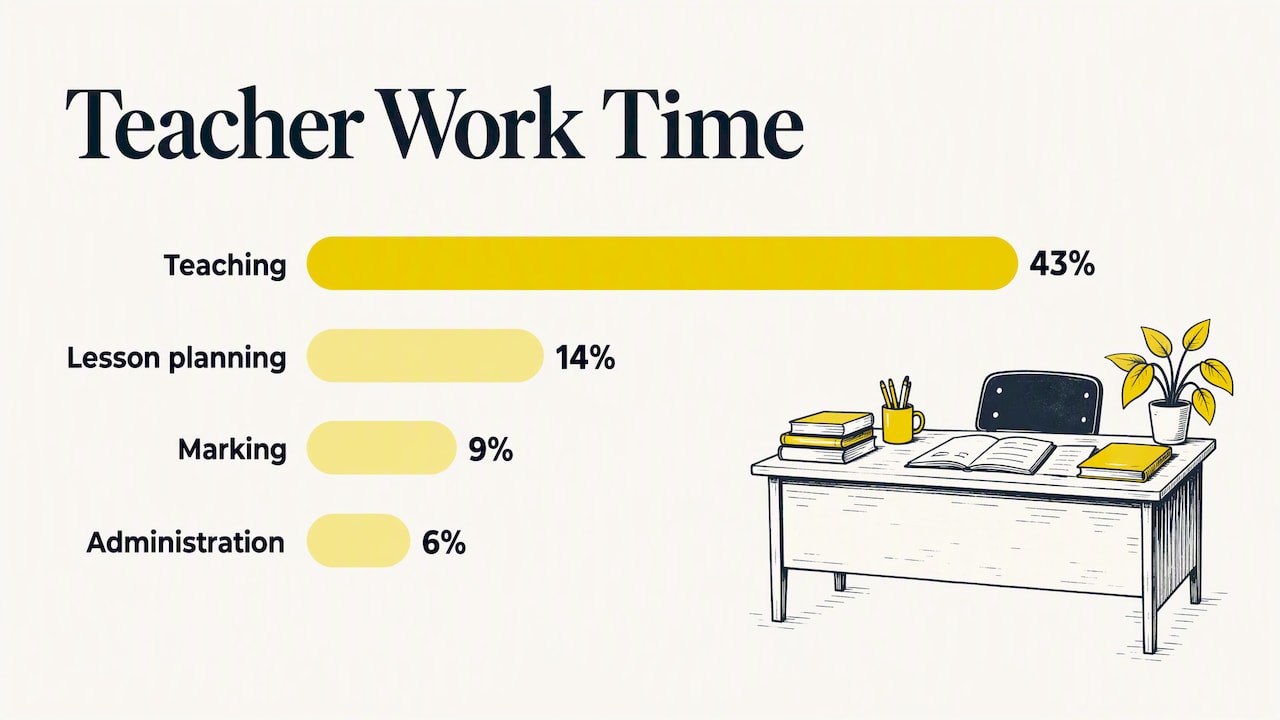
- Teaching is only part of the job. OECD TALIS 2024 data puts it at about 43% of a full-time teacher’s working time, with planning at 14%, marking at 9% and administration at 6%.
- Audit your week first. You cannot fix a time drain you have not measured.
- Inside the lesson, time-box every stage and use light-touch checks for understanding instead of long separate assessments.
- Feedback and follow-up practice are the biggest after-class time sinks. Template them, batch them, or automate the first draft.
- Any tool you adopt must reduce your workload, not add a new dashboard to maintain.
Table of Contents
- Where lesson time actually goes
- Run a one-week time audit
- Before class: plan less, plan smarter
- During class: pacing and checking
- After class: feedback without the evening shift
- Where AI can help, and where it should not
- Our perspective
- How BoostClass fits into the routine
- A simple weekly routine to start with
- FAQ
- Sources
Where lesson time actually goes
Most teachers feel that time vanishes, but the data shows where. According to the OECD’s TALIS 2024 report, teaching makes up roughly 43% of a full-time teacher’s self-reported working time. Lesson planning takes about 14%, marking about 9% and administrative tasks about 6%. The same report finds administrative tasks are the most commonly cited source of stress, named by 52% of teachers on average.
These are averages across many countries, not a measurement of your week. But the pattern is familiar to language teachers, especially those with many small groups or one-to-one students. Each learner has different mistakes, goals and levels, so preparation and feedback multiply with every student you add.
That gives you three places to look:
- Before class: finding or making materials, adapting them to the group.
- During class: pacing, transitions, and how long each activity really takes.
- After class: feedback, progress notes, homework, and messages to students or parents.
Run a one-week time audit
Before changing anything, track your time for five working days. Use a notes app or a simple spreadsheet. Log each block in categories: planning, teaching, feedback, admin, communication, and anything else.
A simple template looks like this:
| Task | Planned time | Actual time | Keep, tweak or ditch? |
|---|---|---|---|
| Building a vocabulary warm-up | 15 min | 30 min | Tweak: reuse a template |
| Writing individual notes after class | 10 min per student | 20 min per student | Tweak: batch and standardize |
| Reformatting slides every week | 20 min | 25 min | Ditch: one fixed layout |
| Chasing homework by message | 10 min | 15 min | Automate |
The last column borrows from the UK Department for Education. Its workload guidance describes a ‘keep, tweak or ditch’ approach in which staff sort tasks into those worth continuing, those to simplify and those to drop, such as lesson plan writing that does not help student progress. It was written for schools in England, but the logic works anywhere, including a freelance teacher’s own calendar.
After the audit, pick the two biggest gaps between planned and actual time. Fix those first. Trying to overhaul everything at once is its own time sink.
Before class: plan less, plan smarter
Preparation is where most teachers can win back the most time without hurting quality.
Plan from the last lesson, not from a blank page
The fastest lesson plans start from what happened last time: which structures students got wrong, which words they avoided, which task fell flat. A blank page invites you to build a perfect, new lesson from scratch. A starting point of three observed gaps and one objective gives you a lesson in a fraction of the time.
A workable pre-class routine:
- Write down one objective for the lesson in a single sentence.
- List the two or three errors or gaps from the last class that you want to revisit.
- Choose a short warm-up, one main activity and one closing check.
- Stop. A lesson with three well-chosen stages beats one with seven rushed ones.
Avoid differentiation by task
The DfE guidance makes a pointed observation: creating different worksheets for different students increases teacher workload without guaranteed benefit. Its alternative is unified, quality-assured resources that free you to focus on classroom interaction.
For language teachers, this means one core activity that can flex through your questions, prompts and support, rather than five versions of the same handout. A speaking task where weaker students get sentence starters and stronger ones get follow-up questions takes one preparation session, not three.
Build a small library you reuse
Keep a folder of formats, not finished lessons: a dialogue gap-fill, a error-correction task, a picture description, a role-play card, a quick quiz. Swap the content and keep the structure. Over a few weeks you stop designing and start filling in.
During class: pacing and checking
Time-box every stage
Overruns rarely come from one big mistake. They come from a warm-up that takes eight minutes instead of five, followed by an explanation that grows. Write a minute count next to each stage on your plan and glance at the clock at each transition.
A sample 50-minute lesson:
| Stage | Minutes | Purpose |
|---|---|---|
| Warm-up and recap | 5 | Retrieve last lesson’s language |
| Presentation or input | 10 | New language in context |
| Controlled practice | 10 | Accuracy |
| Freer speaking task | 15 | Fluency and use |
| Error feedback | 5 | Fix the most common issues |
| Close and next step | 5 | Check, set practice |
If you fall behind, cut the middle, not the ends. The recap and the close do the most to connect lessons.
Check understanding without stopping the lesson
Formative assessment does not have to be a separate task. The Australian Education Research Organisation describes it as helping teachers understand learning in real time so they can adapt their teaching, and treats it as a light-touch continuous cycle, such as exit tickets and probing questions, rather than a formal post-lesson reporting exercise.
In a language class this looks like:
- Asking two or three students to say a model sentence before moving on.
- A one-question exit ticket: write one sentence using today’s target structure.
- Noting three recurring errors on a pad while students speak, then addressing them at the end.
The third habit is the most useful for time. Instead of interrupting speakers, you collect errors and deal with them in one block, which also gives you raw material for the next lesson plan.
Online lessons need extra margin
In video classes, sharing screens, opening links and muting or unmuting add small delays. Add two or three minutes of buffer to your plan, and keep materials in one place so you are not searching for files while students wait.
After class: feedback without the evening shift
For many language teachers the lesson ends at the hour, but the work does not. Notes, corrections and follow-up exercises are valuable, and they are also where the evening disappears.
Keep feedback focused
The Education Endowment Foundation’s Teaching and Learning Toolkit on feedback says digital tools and AI-driven feedback can have positive effects, but cautions against over-specifying how often feedback should be given and against tools that add to teacher workload. It also notes that effective feedback focuses on the task, the subject and self-regulation strategies.
That is a good filter. Ask of every piece of feedback you write: does this help the student do the next task better? If not, shorten it or skip it.
Batch and standardize
- Batch: write all your student notes in one 30-minute block right after your last class, while the lesson is fresh, instead of scattering them across the day.
- Standardize: keep a short bank of phrases for recurring errors, such as article use, verb tense or word order, and adapt them rather than writing from scratch.
- Limit: one strength, one priority error, one next step. Three lines per student is often enough.
Make practice follow the mistake
The most time-consuming after-class task is creating practice that matches each learner’s actual errors. Generic homework wastes the student’s time and yours. Targeted practice works better, but it demands more preparation. This is the clearest place where software can take over repetitive work.
Where AI can help, and where it should not
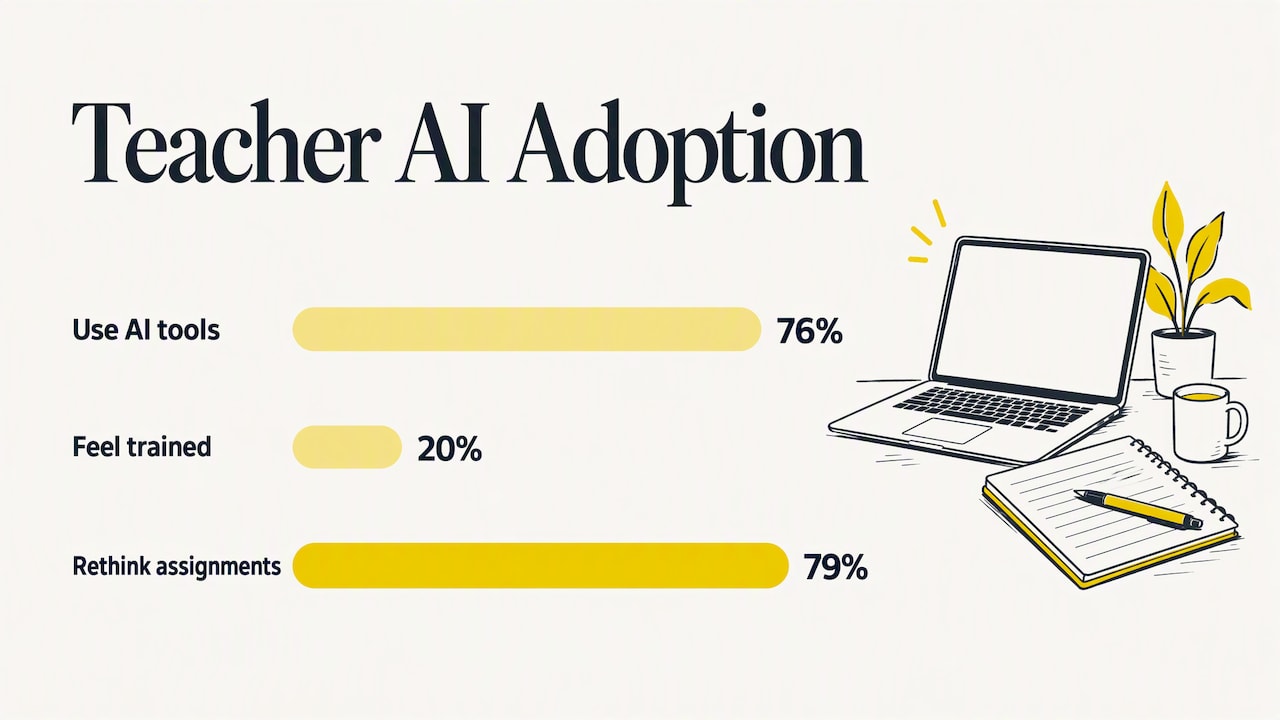
Adoption is already widespread. A 2025 summary in the British Council’s guide for school leaders on AI in language learning reports that 76% of teachers use AI tools, yet only 20% feel sufficiently trained. It also reports that 79% of teachers have had to rethink how they set assignments, either to prevent AI misuse or to integrate it.
That gap between use and confidence matters for time management. A tool you do not trust to use well will cost you time in checking and fixing. The same guidance recommends defining the pedagogical purpose first, then the ethical approach, and only then choosing a tool, so that technology solves a specific teaching challenge rather than being adopted because it is new.
Peer-reviewed work points the same way. A systematic review of ChatGPT in English language teaching concludes that AI can support personalized feedback, self-regulated learning and motivation when treated as a complement to teacher expertise, not a replacement. UNESCO describes a teacher-AI-student dynamic in which teachers move toward the role of instructional design experts.
A practical test for any AI tool:
- Does it remove a task you identified in your audit?
- Can you check and edit its output quickly?
- Do you keep your own teaching style and materials?
- Do students need to install or learn anything new?
- Does the total time go down after two weeks, counting setup?
If the answer to the last question is no, drop the tool. That is the same keep, tweak or ditch logic applied to software.
Our perspective
We build BoostClass for language teachers, so we see the same pattern in nearly every conversation: the lesson itself is the part teachers enjoy, and the preparation and follow-up around it are the part that drains them.
Our view is that time management for teachers is a loop, not a checklist. What you see in class should shape the next lesson’s preparation, and the next lesson’s practice should respond to what students actually got wrong. When those steps are disconnected, you redo the same thinking three times: once when planning, once when giving feedback and once when assigning practice. That is why we designed BoostClass to connect preparation, classroom performance and continuous practice in one flow.
We also hold a firm line on who stays in charge. Technology should handle the repetitive drafting and tracking, and the teacher should keep their method, their materials and the final say. A tool that forces you to change how you teach is not saving you time, it is moving the work somewhere else. And any tool should earn its place by shortening your week, which you can verify with the audit above.
— Cesar
How BoostClass fits into the routine
If you want to automate parts of the before-and-after loop, BoostClass is built for exactly that. Before class, it generates over 20 types of ready-to-use exercises based on previous lessons, identified learning gaps and your teaching objectives. After class, it produces individual student feedback, tracks progress and delivers personalized practice aimed at each learner’s actual mistakes. It integrates with Zoom, Microsoft Teams and Google Meet, supports in-person teaching, and students do not need to install anything.
The plans are published on the BoostClass pricing page:
| Plan | Price |
|---|---|
| Activities | €5 per month |
| Student Intelligence, up to 10 students | €19 per month |
| Student Intelligence, up to 20 students | €34 per month |
| Student Intelligence, up to 30 students | €49 per month |
A subscription starts after a free trial. A sensible way to try it: run your one-week audit first, note how long preparation and feedback take now, then compare after two weeks of using the platform. You can start from the BoostClass home page. Schools weighing options at the level of the whole academy can read our overview of three AI models for language schools.
A simple weekly routine to start with
You do not need to change everything. Try this for four weeks and adjust.
- Monday (15 minutes): review the week’s objectives and pick one format per lesson from your library.
- Before each class (5 minutes): write the minute count for each stage and note the two or three gaps to revisit.
- During each class: jot errors on a pad, run one exit check, keep to the time boxes.
- After each class (10 minutes): write three-line feedback per student, in one batch.
- Friday (15 minutes): look at what took longer than planned and sort it into keep, tweak or ditch.
After four weeks, repeat the time audit and compare. Even small reductions in planning and feedback add up across a full teaching week, and they are easier to hold on to than a dramatic overhaul.
FAQ
How do I stop my lessons from running over time?
Write a minute count next to each stage of your plan and check the clock at every transition. Plan fewer stages than you think you need, and decide in advance which middle activity you will cut if you fall behind. Keep the recap and the close, because they tie lessons together.
How much time should I spend planning one lesson?
There is no universal figure, and the right amount depends on your level, class type and experience. As a reference point, OECD TALIS 2024 data shows lesson planning at about 14% of teachers’ working time on average. Track your own time for a week and aim to cut the planning tasks that do not change what happens in class.
Can AI really reduce teacher workload?
It can when it takes over repetitive drafting, such as exercises and first-draft feedback, and you review the output. The Education Endowment Foundation warns that digital tools must not increase workload, so measure the result over a couple of weeks. If your total time does not fall, change or drop the tool.
What is the best way to give feedback quickly?
Batch it right after class, limit it to one strength, one priority error and one next step, and reuse phrases for common errors. Collect errors during speaking tasks and address them in one block at the end instead of interrupting students.
Do I need different materials for each student?
Not necessarily. The UK Department for Education’s workload guidance questions differentiation by task because it adds preparation without guaranteed benefit. One core activity with flexible prompts and support usually covers a mixed group with far less preparation.
Sources
- The demands of teaching: Results from TALIS 2024, OECD
- Try ideas to manage planning and curriculum workload, UK Department for Education
- Formative assessment at a glance, AERO
- Feedback, Education Endowment Foundation Teaching and Learning Toolkit
- AI in language learning: lessons for school leaders, British Council
- The Future of AI in English Language Teaching: systematic review
- UNESCO publication on AI and teachers