
AI can give a learner detailed comments on a draft in seconds. That solves the teacher’s slowest job, but it does not solve the real problem: feedback only helps when the learner understands it, acts on it and remembers it. Used well, AI takes on the first pass and the repetitive corrections. The teacher keeps the judgement, the encouragement and the decision about what each learner should work on next.
This guide is for language school owners, academic directors and teachers who are weighing up AI writing feedback. It covers what the evidence shows, where generic tools go wrong, how to write feedback comments that change what students do, and how to build a workflow that your teachers and learners will keep using.
TL;DR
- AI feedback on writing has a real, measurable effect on average, but results vary widely depending on how the tool is set up and used.
- One 2025 study found chatbot feedback matched teacher feedback for immediate improvement but not for longer-term retention, so the teacher still matters.
- Good feedback is specific, limited to a few priorities and followed by a task. AI is best at the first pass; people are best at the priorities and the encouragement.
- Configure any tool to your own criteria and tell families and staff how learner data is handled.
- BoostClass connects feedback to what actually happens in the lesson, then turns learners’ real mistakes into personalised practice.
Table of Contents
- Why writing feedback eats so much teacher time
- What the evidence says about automated writing feedback
- Where AI feedback goes wrong
- How to give writing feedback that learners use
- A workable AI feedback workflow for a language school
- Our perspective
- Preparing the lesson that follows the feedback
- Privacy, oversight and honest communication
- Choosing a tool: what to ask before you buy
- Try it with your own classes
- FAQ
- Sources
Why writing feedback eats so much teacher time
Anyone who has marked a set of 15 essays on a Sunday evening knows the arithmetic. A careful teacher reads each piece twice, underlines errors, decides which ones matter, writes a comment on content and organisation, and then often repeats the same advice on the next script. In a language school, where teachers may be part-time, paid by the contact hour and teaching across several groups, that marking is often unpaid or squeezed into gaps.
The consequences show up in three places:
- Delay. Feedback that arrives ten days after the writing is read less carefully, because the learner has moved on.
- Overload. To get through the pile, teachers either correct everything, which overwhelms learners, or write a vague “good effort, watch your tenses”.
- Inconsistency. Two teachers in the same school will mark the same paragraph differently, which makes it hard for an academic director to say anything reliable about quality.
These are the problems AI feedback is meant to address, and they are also why it is tempting to adopt a tool quickly. The sections below explain why it pays to slow down slightly first.
What the evidence says about automated writing feedback
The broad picture is encouraging. A 2023 meta-analysis of 20 studies with 2,828 students found that automated writing evaluation tools had a medium positive effect (g=0.55) on student writing performance. The same analysis includes a warning: the spread across studies was wide, and effects ranged from negative to highly positive depending on implementation. The tool alone did not decide the outcome. How it was used did.
More recent work compares AI directly with teachers. An August 2025 study in Open Praxis looked at feedback from a generative AI chatbot against feedback from a teacher on informative text writing. The chatbot was as effective for immediate improvement, and its feedback was more extensive. But it did not match the teacher’s feedback on long-term retention, and teacher comments did better on the emotional side and on guiding questions.
For a school owner, three practical points follow:
- AI feedback is worth using, because the average effect is real.
- It is not a replacement for a teacher, because the lasting gains seem to depend on the human element.
- Your configuration decides your result, so the way you set up the tool deserves as much attention as the choice of tool.
Where AI feedback goes wrong
It is generic when nobody has told it what to look for
Asking a general chatbot to “give feedback on this essay” produces something fluent and plausible. It will often be long, evenly weighted and unconnected to what your learner studied this week. European guidance for schools notes that AI effectiveness depends heavily on how well it is configured to specific classroom needs rather than on generic, out-of-the-box prompts. A UK Department for Education technical report reaches a similar conclusion: feedback works best with highly structured requirements, and combining rule-based checks with generative AI beats a simple request to an LLM.
It does the thinking for the learner
If the tool rewrites the paragraph, the learner receives a better paragraph and learns very little. Guidance on generative AI in education stresses that AI should support independent reasoning rather than bypass the cognitive work. For a language learner, the cognitive work is exactly the point: noticing the error, forming a hypothesis about the rule and trying again.
It misses nuance and warmth
The Open Praxis researchers found generative AI strong on immediate, extensive and readable comments, but weaker on formatting, complex style and the emotional connection that keeps learners engaged. A teenager who writes a nervous first paragraph in French does not need a flawless list of corrections. They need someone to notice that the paragraph was brave.
It is one-off
A tool that sees only a pasted draft knows nothing about the learner’s history. The DfE report points out that isolated assessments reduce the pedagogical value of AI. A teacher knows that this student has confused since and for three times this term. A stand-alone checker does not.
How to give writing feedback that learners use
Whether the first draft of the comments comes from a person or a machine, the same principles apply. They are also the criteria to use when you judge any AI tool.
- Choose two or three priorities. Pick the errors that block meaning or repeat most often. Leave minor slips for later.
- Say what worked. Quote a good sentence back to the learner. Praise that names something specific shows what to repeat.
- Explain the pattern, not just the correction. “You used the present simple for a finished action in four sentences” teaches more than four red corrections.
- Ask a question. A comment such as “What would the reader need to know before this sentence?” makes the learner revise, not merely accept.
- End with a task. A short exercise on the same pattern turns the comment into practice.
- Keep the tone consistent with your school. A friendly register for young learners, a more formal one for exam candidates.
Example comments, weak and strong
Here is a B1 learner’s sentence: Yesterday I go to the shop and buy two bread.
| Type of comment | Example | Why it works or fails |
|---|---|---|
| Weak | “Check your grammar.” | No location, no pattern, no next step. |
| Over-corrected | “Yesterday I went to the shop and bought two loaves of bread.” | Correct, but the learner learns nothing about why. |
| Strong | “Good detail about where you went. ‘Yesterday’ tells us this is finished, so both verbs need the past tense: go becomes went. Try rewriting ‘buy’. Then do the five-sentence task on irregular past verbs.” | Names a strength, explains the pattern, asks for action, sets practice. |
An AI tool can produce the strong version, but only if you tell it the level, the target language point and the format you want. That is the “structured requirements” the research points to, and it is also why a bare chatbot prompt rarely gives you the third row.
A workable AI feedback workflow for a language school
Here is a sequence we see working in practice for schools that want the speed without losing quality.
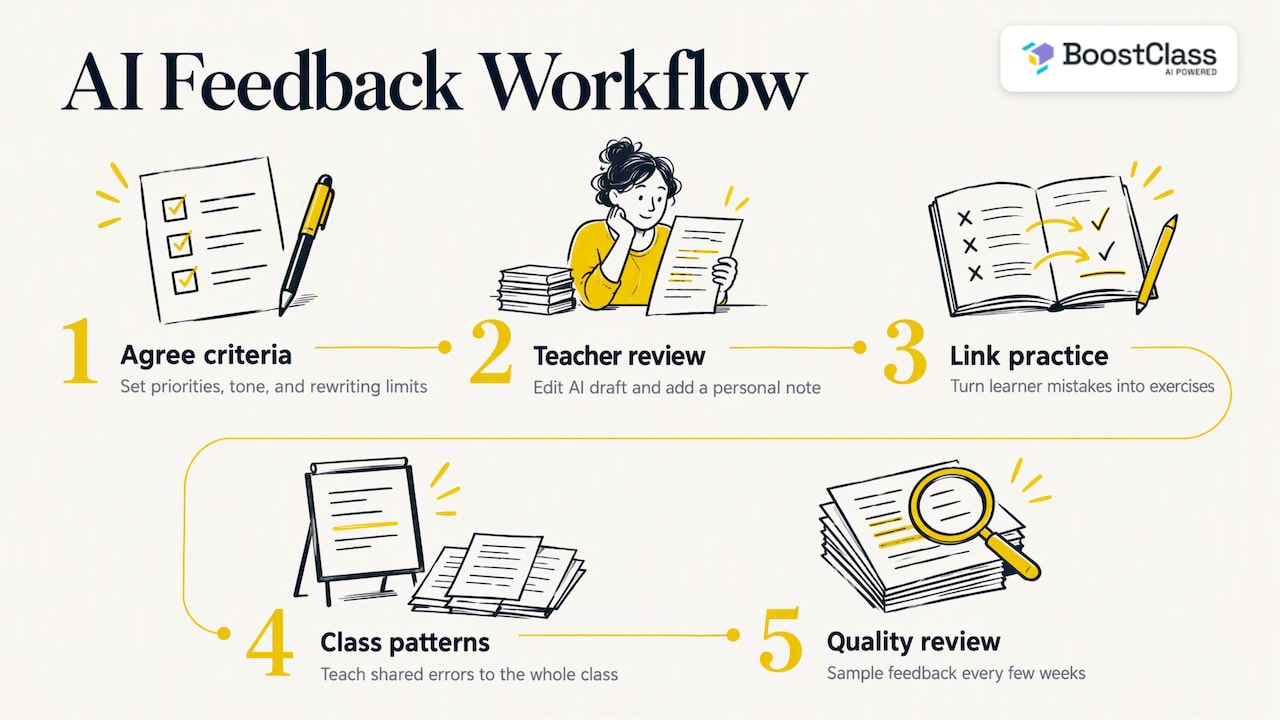
Step 1: Agree your criteria. Academic directors write down what good feedback looks like at each level: how many priorities, what tone, what is never rewritten for the learner. This becomes the brief for any AI tool and the standard for teachers.
Step 2: Let AI draft, let the teacher decide. The tool produces a first pass. The teacher reads it, removes anything wrong or irrelevant, and adds the personal note. This keeps human oversight, which international guidance treats as non-negotiable.
Step 3: Link the comments to practice. Feedback that ends in a comment is forgotten. Feedback that ends in an exercise on the learner’s own mistake is more likely to stick.
Step 4: Check the pattern across the class. If eight of twelve learners mix up the same structure, that is a lesson plan item, not twelve separate comments.
Step 5: Review quality regularly. Sample AI-assisted feedback every few weeks. Look for errors, bias, or comments that do not match your criteria. Educational leaders are advised to carry out this kind of validation before wide adoption, not after a complaint.
A short example
Imagine an online English teacher with 18 private learners across B1 and B2. On Thursday she collects short written answers. A generic tool gives each learner five or six equally weighted comments. With clear criteria, she asks for two priorities and one strength per learner. She spends two minutes per learner reading and adjusting, instead of ten writing from scratch. On Friday she notices that seven learners struggled with conditionals, and she builds Monday’s warm-up around that. The time she saves goes into the part machines handle worst: conversation and encouragement.
Our perspective
We built BoostClass because we kept hearing the same thing from teachers and school owners: the pressure is not only marking, it is everything around the lesson. Preparing it, remembering what happened in the last one, giving each learner something personal afterwards, and proving to a parent that progress is happening. Writing feedback is one piece of that chain.
Our view is that feedback is most useful when it comes from what really happened in a class with a real teacher. A comment that knows the learner stumbled on the past perfect in Tuesday’s lesson is worth more than a perfectly formatted comment on a text with no history. That is why BoostClass captures insights from the live class, whether it runs on Zoom, Microsoft Teams or Google Meet, or happens in person, and uses them to generate individual feedback and personalised practice aimed at each learner’s actual mistakes.
We also believe teachers should keep their own style and materials. AI should remove the admin, not the teacher’s voice. And for school owners, the value is visibility: seeing engagement and outcomes clearly, so that quality is something you can discuss with evidence.
— Cesar
Preparing the lesson that follows the feedback
Feedback is only half the loop. The other half is what you teach next. If your comments show that a group struggles with a structure, the next lesson should deal with it, and building that lesson from scratch is another hour of unpaid work.
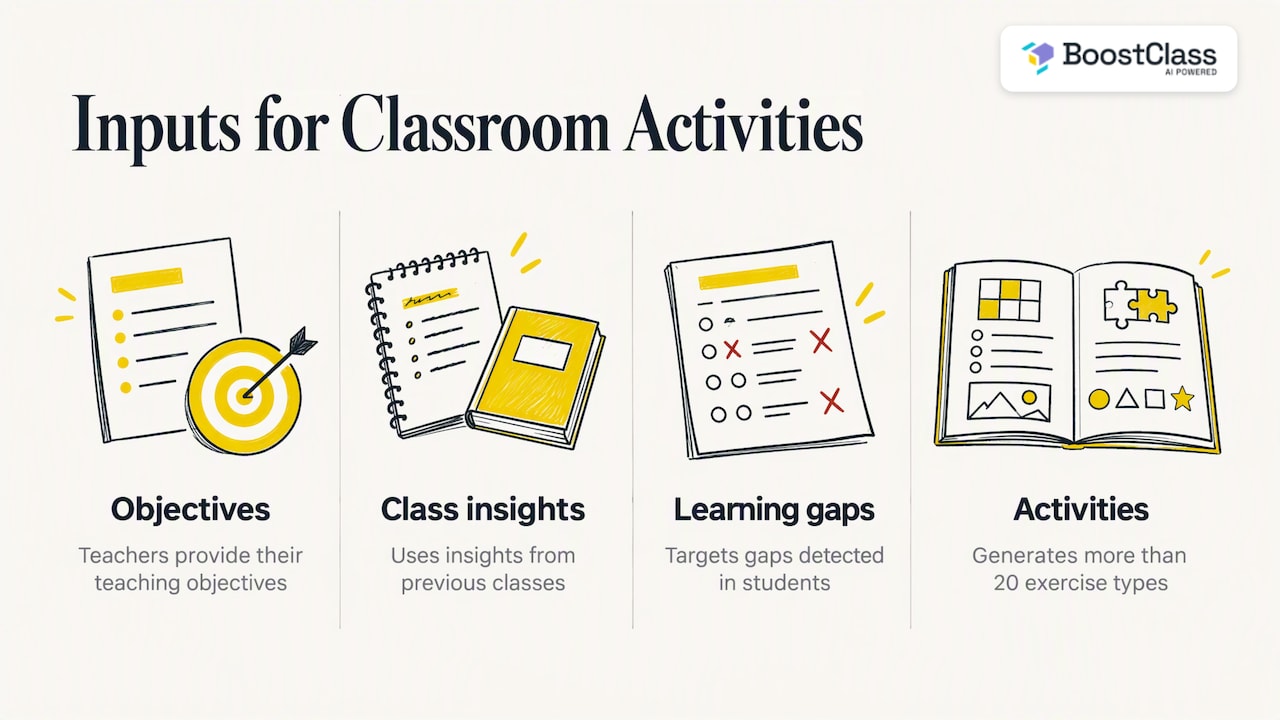
BoostClass Connected Activities is designed for that step. Teachers can generate more than 20 types of classroom-ready exercises, built from three inputs: their teaching objectives, insights from previous classes and the learning gaps detected in their students. A teacher who has just seen a cluster of conditional errors does not search the internet for a worksheet. She generates activities aimed at that gap, in the format she prefers, and adapts them to her own materials.
That makes preparation faster, because the starting point is already relevant, and more personalised, because it is rooted in what the group actually did rather than in the next page of a coursebook. For an academic director it also helps consistency: teachers prepare differently, but each starts from the same evidence.
Privacy, oversight and honest communication
Writing is personal. Learners put their opinions, families and workplaces into their texts, and many are minors. Before you roll out any AI feedback, settle the following:
- Tell families and staff how data is processed. The DfE report advises educators to inform parents and schools clearly, and acknowledges that removing 100% of personal data from AI processing is rarely guaranteed, even in privacy-by-design systems. Do not promise more than that.
- Keep a person in the loop. International guidance, including UNESCO-aligned university guidance, says AI should supplement teachers, with human agency and oversight, and with data protection such as GDPR in the EU respected.
- Test for bias and accuracy. Run a sample of real learner texts, including those from different first-language backgrounds, and see whether the comments are fair and correct.
- Be clear with learners. Tell them which comments come from a tool and that their teacher has reviewed them.
If teachers worry that AI will replace them, answer directly: the evidence supports a partnership, not a substitution. We explore this in more depth in our piece on a human future for AI in English language academies, and in AI for language schools: three models compared.
Choosing a tool: what to ask before you buy
Whatever you evaluate, put these questions to the supplier and to your own team:
| Question | What a good answer looks like |
|---|---|
| Can I set my own criteria and level descriptors? | Yes, and the comments visibly follow them. |
| Does the tool know the learner’s history? | It uses previous classes or work, not a single pasted text. |
| What happens after the comment? | The feedback leads to targeted practice. |
| Can the teacher edit before the learner sees it? | Yes, easily. |
| Do learners need to install anything or create accounts? | The fewer hurdles the better, as every extra step costs engagement. |
| How is learner data handled? | A clear, honest answer you can pass on to parents. |
On that last-but-one point, one of BoostClass’s design choices is that students do not need to install anything.
Try it with your own classes
BoostClass works with Zoom, Microsoft Teams and Google Meet, and supports in-person teaching too. It automates student feedback, personalised practice, progress tracking and lesson preparation in one connected experience. Plans on the pricing page start with Activities at €5 per month. Student Intelligence is €19 per month for up to 10 students, €34 per month for up to 20 and €49 per month for up to 30. You can discover the platform at boostclass.net or try the AI classroom activities directly at app.boostclass.net/activities. For ideas on where AI fits in a centre, our article on how AI is transforming English language centres is a good next read.
FAQ
Can ChatGPT give feedback on writing?
Yes, a general chatbot can comment on a draft, and the comments are often readable and detailed. The weakness is consistency and relevance: without your criteria, level and the learner’s history, the advice tends to be generic. Give it a structured brief and have a teacher check the output.
Is AI writing feedback as good as a teacher’s?
For immediate improvement, one 2025 study found chatbot feedback as effective as teacher feedback. The same study found it did not match the teacher’s feedback for long-term retention, and teachers did better on emotional support and guiding questions. Treat AI as a fast first pass, not a replacement.
How many errors should feedback correct at once?
There is no single magic number, but two or three priorities usually work better than marking everything. Choose the errors that block meaning or repeat most, and set a short task on them. You can return to smaller points in later drafts.
Is it safe to put learners’ writing into an AI tool?
It depends on the tool and your obligations. Tell parents and staff clearly how data is processed, accept that complete removal of personal data cannot always be guaranteed, and follow the data protection law that applies to you, such as GDPR in the EU or UK GDPR in the UK. Avoid pasting sensitive personal details into any tool you have not checked.
What should a school do before adopting AI feedback?
Write down your feedback criteria, pilot with a few teachers, review a sample of comments for accuracy and bias, and agree how teachers will edit before learners see them. Educational leaders advise against adopting tools blindly, so alignment with your teaching objectives comes first.
Sources
- Automated feedback and writing: a multi-level meta-analysis of effects on students’ performance
- The Effect of Feedback on Informative Text Writing: AI or Teacher?
- From digital literacy to AI mastery, European School Education Platform
- Use Cases for Generative AI in Education: Technical report, October 2024
- Guidance for generative AI in education and research