
AI helps language teachers most in three places: preparing lessons, giving each student feedback and practice that fits their actual mistakes, and handling the administration that eats evenings. It does not replace the teacher. The tools that earn their place take work off your desk and leave the teaching, the relationships and the final decisions with you.
This guide is for English and other language teachers, academic directors and school owners. It covers what AI can do, where it goes wrong, and how to introduce it so lessons get better rather than just faster.
TL;DR
- AI is most useful for lesson preparation, materials, feedback and practice. Teachers still decide what reaches the learner.
- General chatbots are good at drafting, but they know nothing about what happened in your last lesson. Tools that capture the real class can personalise far more.
- Check every output for accuracy, bias and privacy before it reaches students, and never paste in identifying details.
- For schools, the payoff is in retention and quality: visible progress, engaged students and less teacher burnout.
- BoostClass connects with Zoom, Microsoft Teams and Google Meet, supports in-person teaching, and generates over 20 types of activities from your objectives and class insights.
Table of Contents
- Where AI actually helps language teachers
- Lesson preparation: the biggest time saver
- How Connected Activities speed up preparation
- Feedback and personalised practice
- Engagement: AI activities students actually enjoy
- Online, hybrid or in person
- What schools gain: workload, retention and quality
- Our perspective
- Risks to manage before you start
- A sensible first month
- Trying BoostClass
- FAQ
- Sources
Where AI actually helps language teachers
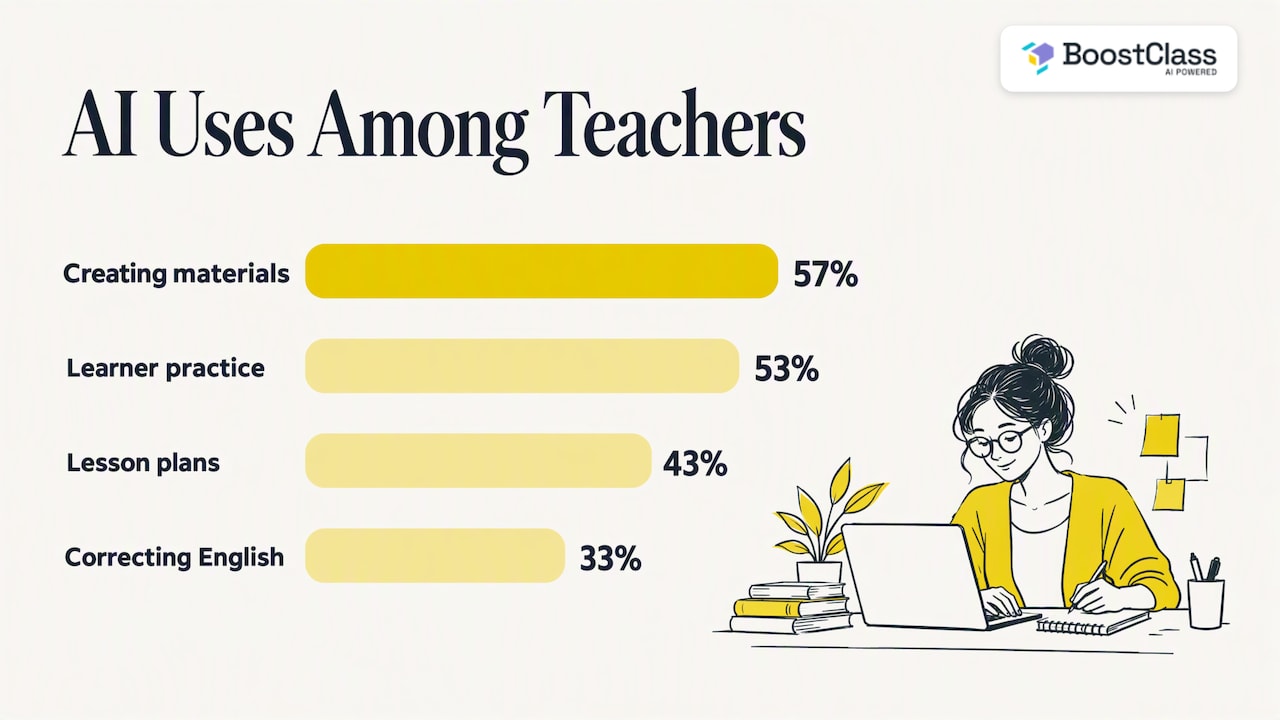
Surveys of English language teachers show where the interest lies. In a 2024 British Council report on AI and English language teaching, 57% of respondents chose creating materials among their AI uses, 53% chose helping learners practise English, 43% chose creating lesson plans and 33% chose correcting learners’ English. Preparation comes first, practice second.
The Council of Europe’s handbook on AI and human rights describes the same split. It lists course planning, time management, material curation, adaptive content and dashboards built on performance, attendance, participation and engagement data as ways AI can support teachers, plus timetabling and system management on the administrative side.
That gives us five practical jobs for AI:
- Lesson preparation: drafting plans, texts, dialogues and exercises.
- Feedback: spotting error patterns and writing individual comments.
- Practice: setting follow-up tasks that match what each learner got wrong.
- Tracking: showing progress over weeks, not just a feeling after a lesson.
- Administration: reports, summaries and the repetitive paperwork around all of it.
Lesson preparation: the biggest time saver
Preparation is where most teachers lose hours, and it is where AI is easiest to try. The British Council’s 2024 guide to AI activities says teachers can ask AI for lesson plans tailored to learners’ level, age, interests, lesson length, aims and a chosen methodology. It also says AI can suggest contexts for grammar, produce scripts, design project-based assignments and offer alternative approaches to the same lesson. Its advice is to compare, evaluate and adapt the result rather than use it unchanged.
Write better prompts
Vague requests produce generic worksheets. The British Council’s 2026 guide to prompt design recommends including learner age, subject, lesson length, learning objectives and activity type, giving the AI a role, supplying examples and breaking complex planning into stages.
A weak prompt: “Make a lesson on the past simple.”
A stronger one: “You are an experienced CEFR B1 teacher. Create a 20-minute speaking activity for adult learners who confuse past simple and present perfect. Include six prompts about work and travel, a short model dialogue and two follow-up questions.”
The second takes thirty seconds longer to write and saves several rounds of editing.
The limit of a blank chatbot
A general-purpose chatbot starts every conversation knowing nothing about your students. It does not know that Marta drops third-person -s, that the whole group avoided the conditional last week, or what you promised to revisit. You become the memory, typing the context in every time. That is the gap we built BoostClass Connected Activities to close.
How Connected Activities speed up preparation
BoostClass Connected Activities generates over 20 types of ready-to-use classroom exercises. You can build them from three starting points: your teaching objectives, insights from previous classes, and learning gaps the platform has detected in your students. You prepare a lesson in minutes, and what you prepare reflects what your learners actually need.
A practical example: your Tuesday group struggled with reported speech in last week’s online lesson. Instead of searching for a worksheet, you open Connected Activities, set reported speech as the objective, and let the previous class insights shape the exercises. You review them, change what does not suit your group, and keep your own style and materials. You can try it at BoostClass AI classroom activities.
The teacher stays in charge of the output. That matches the research: the guidance above is consistent that AI drafts and humans decide.
Feedback and personalised practice
Personalisation is the promise every school makes and few can afford at scale. With 20 students across six groups, individual feedback after every lesson is not realistic by hand.
The British Council’s guide for school leaders on AI in language learning notes that AI systems can act as conversational partners, give instant feedback on grammar and pronunciation, and provide adaptive learning pathways. One quasi-experimental study from Ecuador reported statistically significant gains in verbal fluency and self-correction for students on adaptive AI platforms compared with traditional methods. It is a single study, so treat it as encouraging rather than settled.
In the classroom, the British Council suggests using AI to check grammatical errors, note error types and identify language points to work on. Teachers can also make real-time adjustments: generating an extra explanation or example when students struggle with a specific point.
After class, BoostClass produces individual student feedback automatically, tracks progress and sets personalised practice aimed at each learner’s real mistakes. Because it learns from the live lesson with a real teacher, the practice reflects what was said, not a generic level test. If you want to go deeper on the feedback side, read our guides to real-time feedback for language students and writing feedback with AI.
Engagement: AI activities students actually enjoy
Engagement drops when practice feels repetitive or irrelevant. The British Council lists several ways to use AI with learners: role-play speaking practice, text-to-speech reading support, video-avatar project presentations, pronunciation models, image-based descriptive tasks, songs, chatbots, collaborative story writing and grammatical-error analysis. It also suggests learners assess AI-generated text for accuracy, bias, privacy and data security, which doubles as critical-thinking practice.
Some examples that work in everyday ESL classes:
- Spot the error: give a short AI-written paragraph with planted mistakes and have pairs correct it.
- Role-play rehearsal: learners practise a job interview or hotel complaint with a chatbot at home, then perform it live.
- Personal gap drills: each student gets a short exercise built from their own mistakes in the last lesson, so nobody practises what they already know.
The third is where engagement and personalisation meet. Students tend to engage when the task is obviously about them. With BoostClass, students do not need to install anything, which removes one more reason for them to skip the practice.
Online, hybrid or in person
AI support should not depend on how you teach. BoostClass integrates with Zoom, Microsoft Teams and Google Meet, and it also supports in-person teaching. A school running evening classes in a building and one-to-one lessons online can use one approach across both, instead of splitting its teachers across different systems.
What schools gain: workload, retention and quality
For owners and academic directors, AI is not mainly about shiny activities. It touches three problems.
Teacher workload. Preparation and admin are the invisible hours that lead to burnout. Cutting them gives teachers energy for the lesson itself. Our guide to lesson time management covers the in-class side.
Retention. Students stay when they can see progress and feel the lessons are meant for them. Individual feedback and tracked progress give you something concrete to show learners and parents, rather than hoping they notice improvement.
Teaching quality. BoostClass also analyses teacher performance, with a particular focus on Teacher Talk Time and other metrics. That gives owners an evidence-based view of how lessons run. It works best when presented to teachers as support for development, not surveillance. For more on this, see how AI is transforming English language centres and our comparison of three AI models for language schools.
Our perspective
We built BoostClass on one belief: the most valuable data in language education is what happens in the real class between a real teacher and real students. Generic tools can write a worksheet. They cannot know what your learner said on Thursday, where she hesitated, or which mistake keeps coming back.
So we start from the lesson itself. Insights from the class feed the next preparation, the individual feedback and the practice. Teachers keep their teaching style and their materials; we automate the tedious part. Schools get clear visibility into engagement and outcomes without chasing teachers for reports.
We also hear the worry that AI assistants will push teachers aside. Our view is the opposite. The less time a teacher spends on admin, the more of the job that only a human can do remains: encouragement, judgement, conversation. The research agrees that teachers bring empathy, discussion, cultural awareness and attention to learners’ emotions that AI cannot. Read more in our piece on a human future with AI in English language academies.
— Cesar
Risks to manage before you start
AI in the classroom has real risks, and a school policy should name them.
Accuracy, bias and suitability
The British Council’s AI guidelines for teachers warn of misuse of personal data and biased or unsuitable content. They recommend checking content for fairness, which matters for classes with learners from many cultures. Reading about language immersion benefits is a useful reminder of how varied learners’ backgrounds and needs can be when you review materials for inclusivity.
Privacy
The same guidelines advise removing identifying information from anything you enter and considering how a platform uses data, including its training settings. A simple rule for your staff room: no full names, photos or contact details in a general chatbot, and a read of the privacy terms before adopting any tool.
Over-reliance
An academic study of generative AI in teacher development links good practice to balancing technology with human-centred pedagogy, and names over-reliance as a risk to teacher-student rapport. UNESCO guidance says AI can reduce routine work while teachers stay in control, guide its use and make the final decisions about its suggestions.
Teachers are already split on student use. The British Council reports that 59 per cent of teachers design assignments to incorporate AI appropriately, while 38 per cent design tasks to avoid it. Your school needs a clear line on which tasks allow AI and which do not.
A sensible first month
- Pick one pain point. Preparation for one level, or feedback for one group.
- Write down your baseline. How many hours do teachers spend preparing per week?
- Agree rules. What data may be entered, who checks output, which tasks allow AI.
- Pilot with two or three teachers. Choose a mix of enthusiasts and sceptics.
- Review after four weeks. Compare time spent, student participation and learner comments.
Trying BoostClass
BoostClass pricing is published and runs month to month. Activities costs €5 per month. Student Intelligence is tiered by student numbers: €19 per month for up to 10 students, €34 for up to 20 and €49 for up to 30. Plans start after a free trial; see the BoostClass pricing page for the current details, or discover BoostClass and see how it fits your school.
FAQ
Can AI replace language teachers?
No. The evidence points to AI handling routine work such as drafting, feedback and practice while teachers provide empathy, discussion, cultural awareness and judgement. Teachers should keep final say over what AI suggests.
What is the best AI for ESL teachers?
It depends on the job. For one-off drafts, a general chatbot works if you write detailed prompts. For personalised follow-up based on what happened in your real lessons, you need a tool that captures the class, which is what BoostClass does.
Is it safe to put student work into AI tools?
Only with care. Remove names and identifying details, check how the platform uses data, and review the privacy terms before adoption. Your school should write these rules down for all teachers.
Does BoostClass work for in-person classes?
Yes. It supports in-person teaching as well as online lessons through Zoom, Microsoft Teams and Google Meet.
Sources
- Key AI use cases, Council of Europe handbook on AI and human rights
- AI activities and resources for English language teachers, British Council
- AI for teachers: a practical guide to prompt design, British Council
- Artificial intelligence and English language teaching, British Council
- AI in language learning: lessons for school leaders, British Council
- Inteligencia Artificial y Aprendizaje de Idiomas, Revista Veritas
- Getting started with AI in the language classroom, British Council
- Generative AI on professional development, Frontiers in Education
- British Council AI guidelines for teachers
- Improve Foundational Learning in Sub-Saharan Africa, UNESCO
- Language immersion benefits