A personalised learning pathway is a route through your course that changes for each learner. It is built from what they already know, what they need to do in the language, and the mistakes they keep making. In a language school, that means the student who drops articles and the one who freezes on the phone do not get the same homework. This guide shows how to build pathways without adding hours to your teachers’ week.
TL;DR
- A pathway is not a separate course per student. It is a shared curriculum with different practice, pace and feedback attached to each learner.
- Start from three inputs: the learner’s goal, a quick baseline of prior knowledge, and the errors seen in real lessons.
- Software can do the sorting and the practice generation. The teacher still decides what matters, and should check what the AI produces.
- Choose tools on pedagogy, data protection and teacher training first, and features second.
- The payoff for a school is visible: less preparation, more relevant lessons, better engagement and a stronger case for renewal.
Table of Contents
- What a personalised learning pathway actually is
- Why language schools feel the pressure
- Building an individual pathway in four steps
- A worked example: two learners, one group
- What personalised learning software can and cannot do
- How BoostClass builds pathways from the real lesson
- Perspective: pathways should make teachers more human, not less
- What to check before choosing a platform
- Common mistakes when rolling out pathways
- Try it in your school
- FAQ
- Sources
What a personalised learning pathway actually is
Research describes personalised pathways as flexible, learner-centred frameworks that organise objectives, materials and sequences around individual characteristics such as prior knowledge, needs and motivation. The key word is frameworks. The destination, for example a B2 exam or confident meetings in English, may be shared. The route differs.
Compare it with a standard sequence. In a coursebook sequence, unit 5 follows unit 4 for everyone, and the quiet student who failed unit 4’s grammar still moves on. In a pathway, the next step depends on evidence. Two learners in the same group might finish the same lesson and leave with different tasks:
| Standard sequence | Personalised pathway | |
|---|---|---|
| Next step | Next unit for everyone | Chosen from the learner’s gaps and goal |
| Homework | Same worksheet | Practice targeting that learner’s own errors |
| Feedback | Generic, when time allows | Individual, after each lesson |
| Pace | Set by the class average | Adjusted by progress |
| Teacher’s role | Deliver the plan | Read the evidence, adapt the plan |
You will also see these called individual learning pathways or personalised learning paths. The idea is the same, though “individual” tends to suggest one-to-one tutoring, while “personalised” is usually applied to groups.
Why language schools feel the pressure
The problem is rarely a lack of belief in personalisation. It is capacity. Consider an academic director with 12 teachers and 150 students:
- Lesson preparation. A teacher with six groups cannot write six tailored sets of exercises each week, so they reuse materials.
- Teacher workload. Feedback and reports are the first tasks to slip when the timetable is full.
- Student engagement. When practice feels irrelevant, attendance and homework completion fall.
- Retention. Students stay when they can see progress that is theirs. A learner who cannot say what has improved is easier to lose at renewal time.
- Teaching quality. Without data from the lessons themselves, a director relies on the odd observation.
A pathway system is worth having if it relieves these five pressures. If it adds a sixth task, such as manual data entry, teachers will drop it.
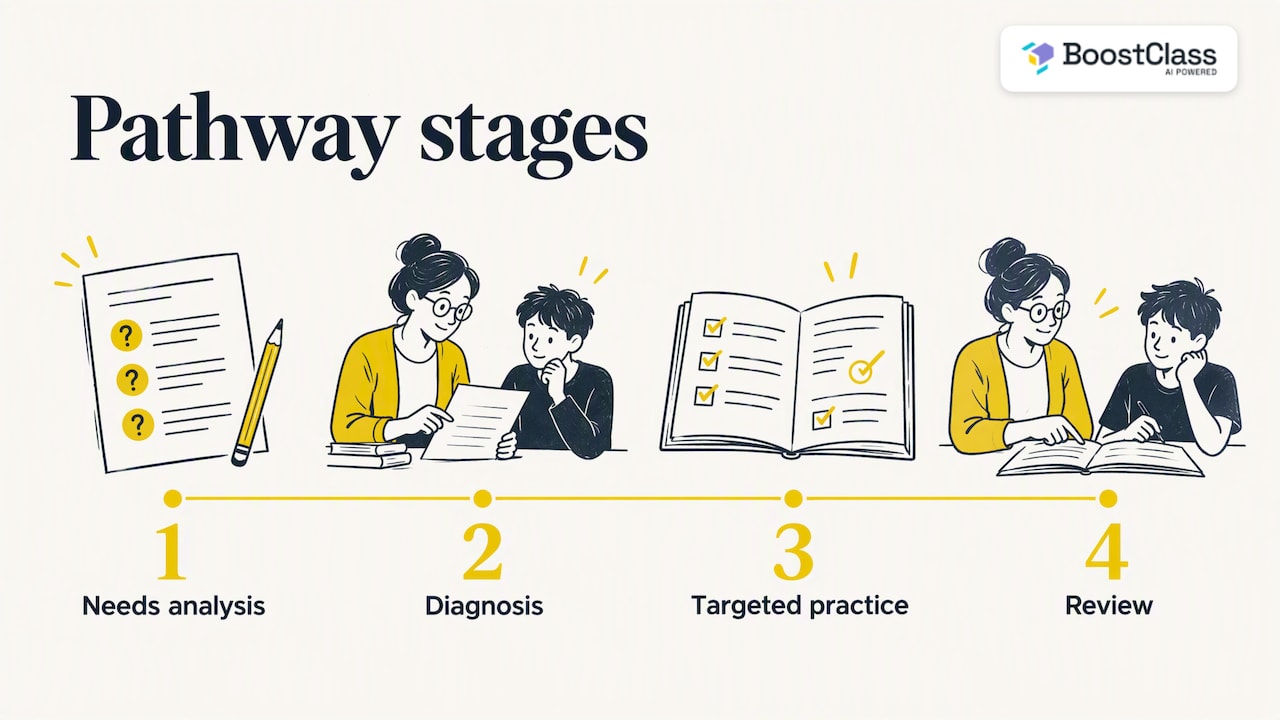
Building an individual pathway in four steps
There is no single official recipe. Most good practice combines needs analysis, diagnosis, targeted practice and review. The Council of Europe’s guide to planning with the CEFR makes the starting point plain: needs analysis should ask what learners most need to be able to do in the language, not only list their linguistic gaps.
Step 1: Define the goal in terms of action
Ask each learner, in the first lesson, what they want to do in English. “Pass FCE” is a goal. So is “lead a weekly stand-up with colleagues in Lisbon”. The second tells you more: you now know the register, vocabulary and listening demands. Write it in one sentence and keep it where every teacher of that student can see it.
Step 2: Establish a baseline
Use a short diagnostic, a speaking task or a placement conversation. The aim is not a perfect level label. It is a first list of what the learner can already do and what is missing. Tools for diagnostic assessment can tailor tests to a learner’s level, but a ten-minute conversation with a teacher who listens carefully is a legitimate baseline too.
Step 3: Track the gaps that show up in real lessons
This is where most pathways fail. The baseline is a snapshot, but the useful evidence appears week after week: the same tense error, the same pronunciation slip, the same word avoided. Teachers see these in the moment and rarely have time to log them. Whatever system you use, it has to capture gaps from live lessons without asking the teacher to stop and type.
Step 4: Match practice to the gap, then review
For each recurring gap, assign a short practice task that targets it, and re-check after a fixed period, perhaps three or four weeks. Formative checks matter here. The Digital Lingua toolkit describes using checkpoints, voice notes and live polls to monitor progress with low-stakes feedback. If the gap has closed, retire the task and pick the next one. If not, change the method rather than repeat it.
A worked example: two learners, one group
Take an evening B1 group of six on Microsoft Teams. Two students, Marta and Dev, are in the same lesson on talking about past experiences.
- Marta wants to move to a UK-based role. In the lesson she mixes up past simple and present perfect and is hesitant on interview vocabulary.
- Dev wants to pass a B2 exam. His grammar is accurate, but his answers are short and he rarely develops an argument.
After the lesson, a standard system sends both the same worksheet on irregular verbs. A pathway sends Marta contrast practice on past simple versus present perfect framed around work history, and sends Dev tasks that push him to extend answers with reasons and examples. Next week the teacher opens the session knowing both gaps without having to remember them. That is the whole idea in miniature.
What personalised learning software can and cannot do
Software is good at the repetitive parts: sorting errors, generating practice at the right level, producing individual feedback and keeping a progress record. Research reviews report that AI-driven systems can offer personalised, adaptive language-learning experiences and support vocabulary acquisition. The same review lists benefits such as improved vocabulary retention and motivation, and challenges that include digital inequality, insufficient teacher training and algorithmic bias.
The limits matter as much. A review of the research notes that AI can promote learner autonomy but needs emotional scaffolding and pedagogical support to avoid dependency or technostress. In plain terms, a learner who is told to “follow the app” with no human contact will not be well served. A pathway works when the teacher stays at the centre and the software removes the clerical load around them.
How BoostClass builds pathways from the real lesson
BoostClass is an AI-powered platform for language education. It is built around one idea: the best evidence about a learner is what happens in the lesson with a real teacher. It connects with Zoom, Microsoft Teams and Google Meet and also supports in-person teaching, so a school with a mix of online and classroom groups can use one system. Students do not need to install anything.
Across the pathway cycle above, the platform covers these jobs:
- Lesson preparation. Connected Activities generates over 20 types of classroom-ready exercises. Teachers can build them from teaching objectives, insights from previous classes and detected learning gaps, so the next lesson starts from where the group really is.
- After the lesson. BoostClass generates individual student feedback automatically.
- Practice. It delivers personalised practice aimed at each learner’s actual mistakes and areas for improvement.
- Tracking. It follows progress over time, which gives teachers and directors a record to point to.
Teachers keep their own teaching style and materials. For owners, the platform also analyses teacher performance, with a focus on teacher talk time and related metrics, which gives insight into how lessons are run.
Preparing lessons faster and more personally
Here is how Connected Activities changes a Tuesday-night prep session. Without it, a teacher scrolls through old slides and guesses what the group needs. With it, the teacher states the objective, for instance “talking about experiences”, and the activities draw on what was detected in earlier lessons. A group that struggled with present perfect gets a practice activity on exactly that, not a generic grammar page. The teacher reviews, edits and runs it. Preparation drops from an evening to minutes, and the content is more relevant to the room. You can try the AI classroom activities directly.
If your team also builds its own course content, the skill of drafting with AI while keeping the design human applies there too, and a guide to AI-assisted course creation covers that workflow well.
Perspective: pathways should make teachers more human, not less
We built BoostClass because we saw the same pattern in language schools. Good teachers noticed everything in the lesson and then lost most of it by Wednesday, because there was no time to write it down, let alone act on it. Personalisation was a promise made at enrolment and quietly dropped under workload.
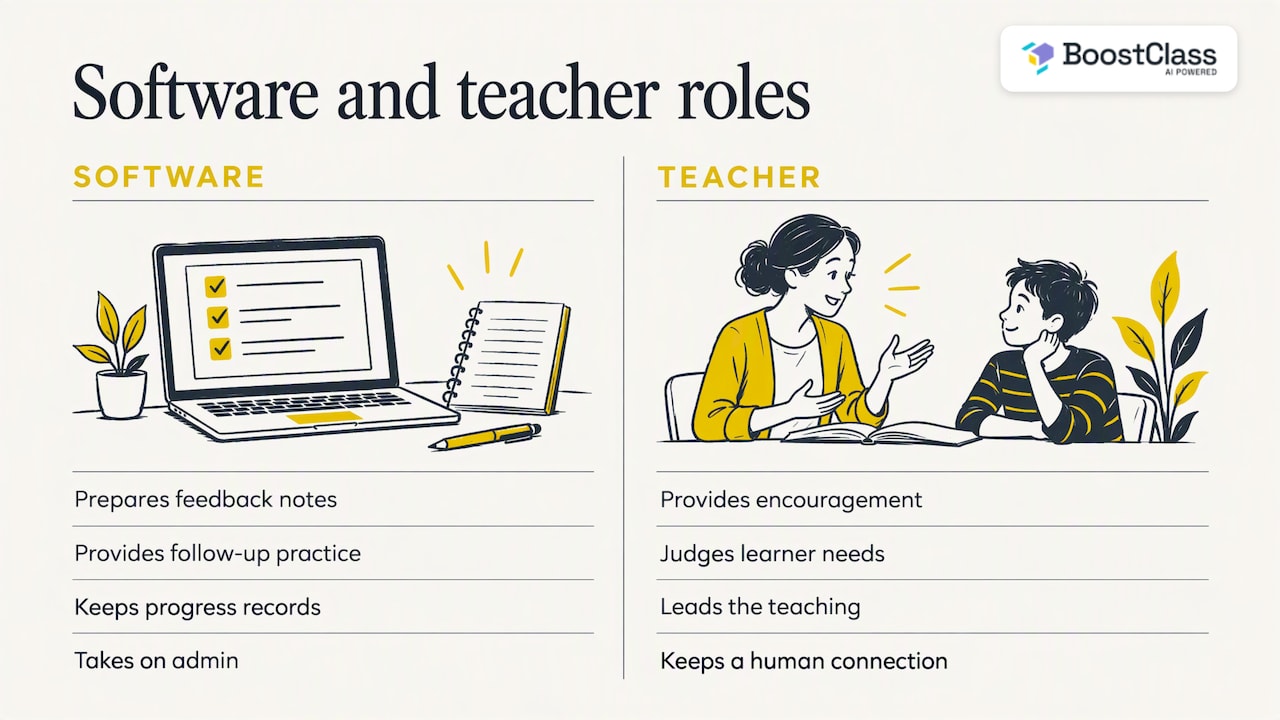
Our view is simple. The lesson with a real teacher is the richest data a school has, so a pathway should start there, not with a generic placement test that never changes. Technology should take on the admin: the feedback notes, the follow-up practice, the progress record. The teaching itself, the encouragement and the judgement about what a nervous learner needs today stay with the teacher. We would rather a teacher spend ten minutes thinking about a student than an hour formatting a worksheet.
We also think directors deserve visibility. If you can see engagement and outcomes by group, and how much time students actually speak, you can coach teachers and show families what their fees are buying. That is good for quality, and it is good for retention.
— Cesar
What to check before choosing a platform
Be sceptical of feature lists. A better test is a short set of questions your academic team can ask any vendor, including us.
- Does it serve your pedagogy? The British Council’s guide for school leaders argues that AI integration should prioritise educational goals and human agency over technological possibility. Ask how teachers can edit and override outputs.
- Where does the data come from? Pathways built on real lesson evidence adapt better than ones built on a single placement score.
- How is learner data protected? UNESCO’s guidance on generative AI in education recommends protecting data privacy and considering an age limit for use. If you teach under-18s, ask for the vendor’s policy in writing.
- Is there bias or a narrow language range? The research flags algorithmic bias and limited linguistic range as real risks, so test with your own learners’ accents and errors.
- How much training will teachers need? Professional development is essential so teachers can appraise AI outputs critically and fit them into the curriculum.
- Does it fit your teaching mix? Online, in-person or both. Check which video platforms it works with.
Two more reads on our own site cover the school-level view: three models of AI for language schools and how AI is changing English language centres.
Common mistakes when rolling out pathways
- Personalising everything at once. Start with one level or one group and prove the time saving.
- Treating the level label as the pathway. Two B1 students can need opposite things.
- Giving feedback with no follow-up. Feedback becomes a pathway only when it triggers targeted practice.
- Ignoring emotion. Learners who feel watched or overloaded disengage. Keep tasks short and celebrate visible progress.
- Measuring only test scores. Add engagement, speaking time and completion of practice, so you spot a problem before a student leaves.
The broader lesson from implementation research is that personalised learning demands continuous effort across the whole system, not just a new tool. Plan for a term, not a week.
Try it in your school
BoostClass is a subscription with a free trial. The Activities plan costs €5 per month. Student Intelligence, which adds individual feedback, personalised practice and progress tracking, is €19 per month for up to 10 students, €34 for up to 20 and €49 for up to 30. See the current plans and pricing, or discover BoostClass to see how it fits your timetable.
FAQ
What is the difference between personalised and adaptive learning?
Personalised learning is the wider idea: goals, pace, content and support are shaped around the learner, often with a teacher’s input. Adaptive learning usually means software that changes the next task automatically based on responses. Adaptive technology can be one engine inside a personalised pathway.
How many learners can a teacher realistically personalise for?
It depends on how much of the work is automated. Doing it by hand, most teachers manage a handful of learners. With tools that generate feedback and practice from each lesson, a teacher can cover whole groups, because the planning shifts from writing materials to reviewing them.
Do personalised pathways work for in-person classes?
Yes. The method relies on noticing gaps and assigning targeted practice, which does not depend on the room. BoostClass supports in-person teaching as well as Zoom, Microsoft Teams and Google Meet.
Will AI replace the teacher in a pathway?
Not in a sound design. Research stresses human agency and pedagogical support alongside AI, and learners benefit from a teacher who interprets the evidence. The software handles repetitive admin so the teacher can focus on teaching.
Sources
- Construction of personalized learning pathways (ERIC)
- Planning and teaching with the CEFR, Council of Europe
- AI in language learning: lessons for school leaders, British Council
- Digital Lingua Toolkit
- Artificial Intelligence in Language Learning: A Systematic Review
- UNESCO guidance on generative AI in education
- Personalized Learning Practice in U.S. Learner-Centered Schools