
The best virtual classroom routines are small, repeatable habits for three moments: before the lesson (preparation and shared agenda), during it (a warm-up, narrated transitions, structured speaking turns) and after it (feedback and practice). Online, students cannot read the room as easily, so predictability does the work that body language does in a physical classroom. This guide is for teachers, academic directors and school owners who want online lessons that run smoothly without adding to anyone’s workload.
TL;DR
- Build every online lesson on the same skeleton: early arrival chat, warm-up, short overview, interactive tasks, a check of understanding, a clear close.
- Put instructions in the chat, use timers and give breakout-room roles, so students always know what to do next.
- Use quick participation routines (think-pair-share, chat waterfall, one-minute talks) to spread speaking time across the whole group.
- Keep feedback prompt and light: short verbal correction and a shared document beat written comments for every learner every time.
- Automate what drains teachers: preparation and post-lesson admin. Check any AI output before it reaches students.
Table of Contents
- Why routines matter more online
- Before class: routines that cut preparation time
- The first ten minutes: an opening routine
- During the lesson: routines for instructions, transitions and turns
- Quick routines that get learners speaking
- Checking understanding and giving feedback in real time
- After class: keep the loop closed without more admin
- Adapting routines to age, level and connection
- Using AI in your routines without losing control
- Our perspective: routines are how schools protect teaching quality
- Try it in your own lessons
- FAQ
- Sources
Why routines matter more online
In a physical room, a teacher can see who is lost, who is bored and who is about to speak. On a video call you see a grid of faces, some with cameras off, and a chat box that nobody is watching. Routines replace the missing signals. When students know that every lesson starts with a quick chat, that instructions always appear in the chat, and that every lesson ends with a one-line check, they spend their attention on the language rather than on working out what is going on.
For a school, routines also solve a management problem. Teaching quality varies when each teacher invents their own structure. A shared skeleton that teachers can personalise gives directors something consistent to observe, support and improve, and gives students the sense that a lesson at your school feels organised whoever is teaching.
Princeton’s L2 Remote guide describes a typical online language class as a warm-up, a brief overview of what the class will cover, interactive tasks and collaborative work in a shared document. It also says effective language teaching balances presentation and interaction, keeps a suitable tempo and uses technology in a planned sequence. That is a good description of what a routine is: a planned sequence you do not have to reinvent.
Before class: routines that cut preparation time
Preparation is where most teachers lose their evenings. The routine that saves the most time is to prepare from evidence rather than from a blank page. Before each lesson, ask three questions:
- What was the objective of this lesson in the course plan?
- What went wrong or was skipped last time?
- Which mistakes did this particular group make that we have not yet addressed?
A 15-minute prep slot built on those questions beats an hour of browsing for materials. If you want a deeper walk-through, our guide to AI lesson planning for language teachers covers the process step by step.
Share the plan in advance
Sending an agenda before class is a small habit with a large effect. Guidance from Give recommends sharing agendas, lesson plans or preparation materials beforehand and sending them afterwards to students who could not attend. Imperial College London adds that a session plan with timings helps students who lose connection or join late to rejoin the relevant part of the lesson live.
A useful agenda for a 60-minute adult class might look like this:
| Minute | Block | What students do |
|---|---|---|
| 0-5 | Arrival chat | Small talk in the target language |
| 5-10 | Warm-up and overview | Recycle last week’s language, see today’s goal |
| 10-30 | Main task | Pair or group speaking in breakout rooms |
| 30-45 | Language focus | Correct and extend what emerged in the task |
| 45-55 | Second task | Apply the new language |
| 55-60 | Check and close | One-line exit answer, homework preview |
If timing is where your lessons slip, our lesson time management guide goes into pacing in more detail.
Where Connected Activities fit
This is the stage BoostClass Connected Activities is built for. Teachers can generate more than 20 types of classroom-ready exercises, and the lesson can be prepared from three inputs: the teaching objective, insights from previous classes and the learning gaps detected in a student’s or group’s work. Instead of searching for a gap-fill that roughly matches, you start from what your students actually got wrong. Teachers keep their own teaching style and materials; the tool takes over the slow part of building the exercises.
The first ten minutes: an opening routine
The start of an online lesson sets the tone. Princeton’s guide suggests opening the session five to ten minutes early for one-to-one small talk in the target language about familiar topics such as weather, recent activities, food, sport and local events. It is low pressure, it gives early arrivals real speaking practice and it lets you check audio and connection before the lesson proper.
A simple opening routine:
- Open the room early and greet each student by name as they arrive.
- Pin the agenda in the chat or on the first slide.
- Run a two-minute warm-up that recycles last lesson’s language, such as three sentences about your weekend using the past simple.
- State the goal in one sentence: by the end of today you will be able to do X.
- Set ground rules once, then reinforce them kindly. ESLbase suggests agreeing simple rules early, such as cameras on if possible, muting when not speaking and arriving on time.
For younger or lower-level groups, agree the rules together and show them as pictures or short phrases. Students keep rules they helped to write.
During the lesson: routines for instructions, transitions and turns
The most common online breakdown is not a grammar problem. It is students not knowing what they are meant to be doing. Three habits fix most of it.
Write instructions down and time them
A British Council handout on online interaction recommends leaving instructions in the chat, using timers, assigning breakout-room roles, providing useful-language banks and allowing planning time. Harvard’s online case-teaching guide makes a similar point about group work: explain the activity clearly beforehand, ideally in writing, and assign a spokesperson to report back to the main session.
A breakout instruction that works is short and complete:
Rooms of three, eight minutes. Student A asks the questions, Student B answers, Student C takes notes and reports back. Useful phrases are in the chat.
Paste it into the chat before you open the rooms, not after. Once students are in breakouts, you cannot easily reach them.
Narrate every transition
Keith Taylor of ESLbase argues that engagement is something teachers can engineer by mixing interaction types and narrating each change of activity, so students do not feel lost. In practice that means saying: we are finishing the reading now, next is a pair task, you will have two minutes of thinking time first. It costs ten seconds and removes a lot of confusion.
Use chat conventions to manage turns
Cornell’s teaching centre suggests agreeing chat and labelling conventions, such as typing an asterisk to signal a question or comment, which helps the teacher decide whom to call on. In a language class, you can adapt that: a plus sign for I agree, a question mark for I need help, a star for I want to speak. Students learn the code in one lesson.
The British Council handout also recommends stopping screen sharing during speaking tasks so learners can see one another. It sounds minor, but a slide covering everyone’s face makes a conversation feel like a presentation.
Quick routines that get learners speaking
Engagement is a retention issue as well as a classroom one. Students who speak in every lesson feel progress and stay. Students who sit through a lecture on a screen drift away. These routines are quick and reusable.
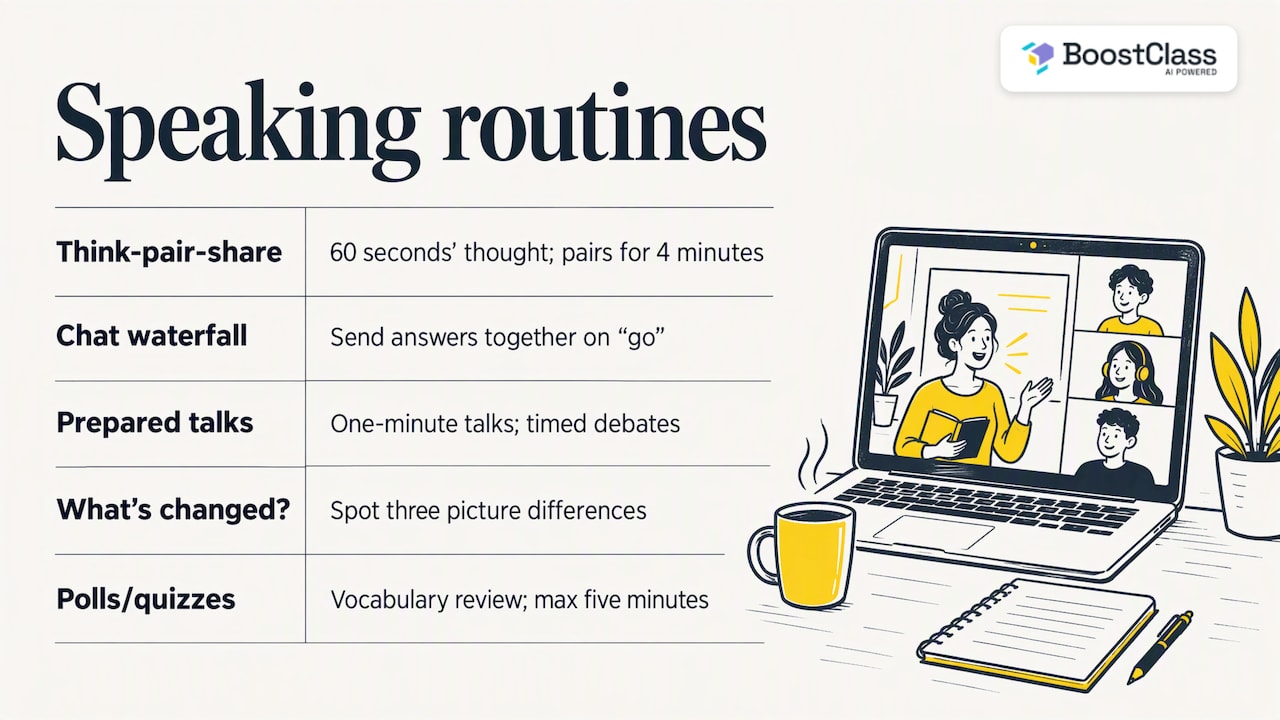
Think-pair-share. TESOL’s 2021 guidance recommends giving learners thinking time, then sending pairs to breakout rooms to take notes, before they report back and answer follow-up questions. A concrete version: ask why people might choose to live in a city, give 60 seconds of silent thinking, pair students for four minutes, then ask two pairs to summarise.
Chat waterfall. Everyone types an answer but nobody presses send until you say go. Then everyone sends at once. Orenda Education presents it as a quick, low-preparation way to give all learners thinking time and a simultaneous chance to take part. It suits shy students and large groups. Follow it with an open-microphone question about one or two of the answers, a sequence the British Council handout also recommends.
Prepared short talks. The British Council’s guidance on verbal participation suggests ideas such as story starters, one-minute talks and timed debates, with preparation time, a listening task for everyone else and nominated turns. The listening task matters: it gives the audience a reason to pay attention.
What’s changed? Share a picture, change three details and ask students to spot and describe the differences. It practises description language and needs almost no preparation.
Polls and quizzes for quick checks. Live quizzes work well for vocabulary review. If you are weighing up your options, this comparison of live quiz tools for classes helps you decide which suits a short review round. Keep them to five minutes so the lesson stays centred on speaking.
If you want these routines to feed into communicative tasks rather than stand alone, see our task-based language teaching examples.
Checking understanding and giving feedback in real time
A routine for checking understanding is what separates a busy lesson from an effective one. The Australian Education Research Organisation says teachers should check understanding throughout a lesson, invite individual, group and whole-class responses, and give prompt verbal correction, reteaching or scaffolding rather than attempting written feedback for every learner in every lesson.
That last point is a relief for teachers. You do not need to mark everything. A workable pattern:
- Mid-lesson: ask for a thumbs-up, a number from 1 to 5 in the chat or a one-word answer.
- After each task: note two or three common errors on a shared document, anonymised, and correct them as a group.
- End of lesson: ask one question in the chat or in a form. ESLbase recommends an end-of-lesson question and feedback through chat or a shared document.
UNICEF’s guidance on formative assessment adds that routines should be explained, modelled and framed as low stakes, then practised repeatedly. Monitoring the chat and changing groupings can also stop one student dominating and help quieter ones. If students fear being embarrassed by a wrong answer, they will not give one, so say plainly that errors are data, not failures.
For more on this, our guide to real-time feedback for language students looks at what teachers can give during the lesson, and our piece on writing feedback with AI covers the written side.
After class: keep the loop closed without more admin
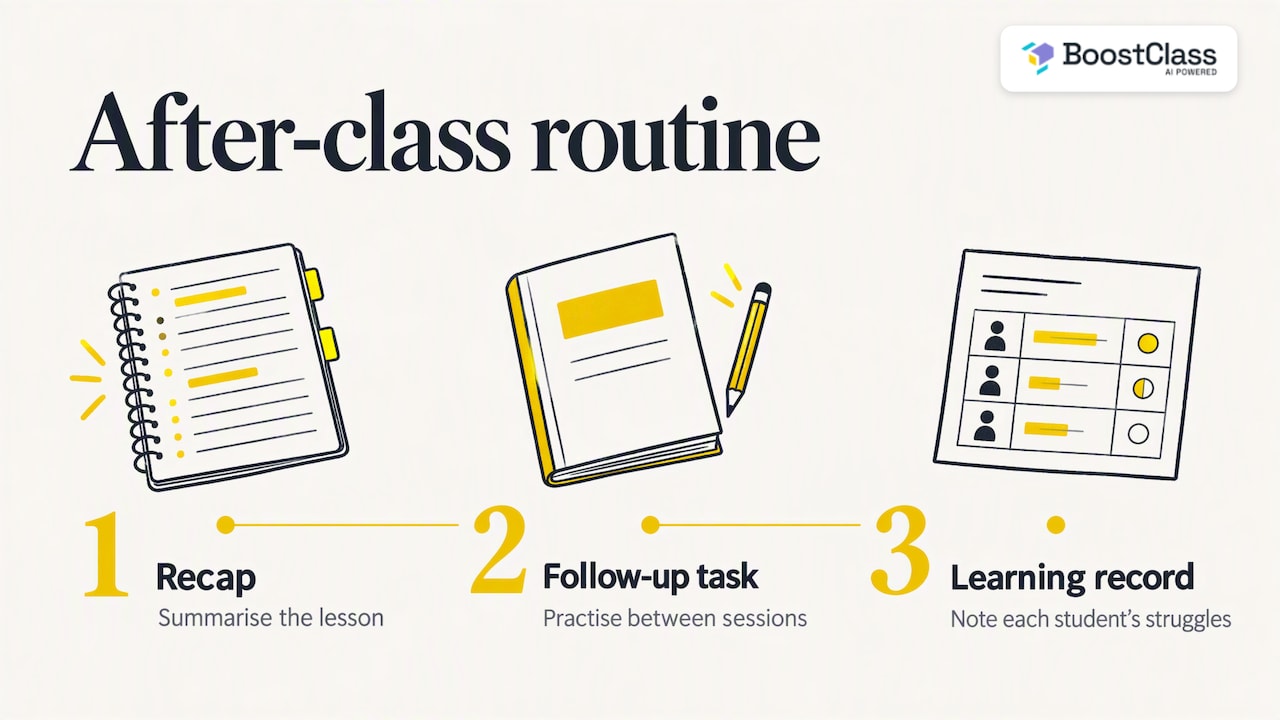
Many online schools run good lessons and then lose the learning, because nothing happens between sessions. A closing routine has three parts: a recap, a short follow-up task and a record of what each student struggled with.
Imperial College London notes that offline independent tasks between online sessions can provide breathing space and catch-up time. That fits language learning well, where regular short practice beats one long session.
The difficulty is personalisation. Writing individual feedback for 30 students is not realistic. Technical University of Munich guidance says timely feedback need not be time-consuming: model answers or pre-written feedback can be adapted, and self-review, peer review and brief overall comments can reduce the teacher’s load.
This is the second gap BoostClass is designed to close. After class, it generates individual student feedback, tracks progress and delivers personalised practice aimed at each learner’s actual mistakes. It works with Zoom, Microsoft Teams and Google Meet and also supports in-person teaching, so a school running a mix of online and classroom groups can use the same workflow. Students do not need to install anything. Our guide to personalised learning pathways explains how that practice is structured.
Adapting routines to age, level and connection
A routine is a frame, not a script. Adjust it for the group in front of you.
- Young learners: shorter blocks, more movement, visual instructions. Give parents or carers the agenda beforehand. Give recommends polls, chat and whiteboards, and even calm activities that caregivers and children can do together.
- Low-level adults: more modelling, sentence frames in the chat and longer planning time before speaking. Pair a stronger student with a weaker one in breakout rooms.
- Unreliable connections: send the agenda and materials in advance and share a recording or notes afterwards. Imperial’s advice on session plans with timings helps students rejoin the right moment.
- Shy groups: vary the response method. AERO notes that using several response types supports participation, including for shy learners, and helps teachers see who needs what.
Using AI in your routines without losing control
AI can shorten preparation and feedback, but the teacher stays responsible for what students see. The University of Melbourne tells staff to carefully review and correct AI-generated content, because tools can make mistakes or produce inaccurate information. A 2026 paper in Frontiers proposes a human-AI synergy model in which AI complements conventional teaching rather than replacing it, and says students should be able to find out how and why their evaluations were made.
A practical checklist for schools:
- A teacher reads every generated exercise before it goes to students.
- Students can ask why a piece of feedback says what it says.
- You know where student data is stored and who can use it.
- AI handles preparation and admin; the teacher handles the conversation.
Our article on what works with AI for language teachers goes further on keeping the human at the centre.
Our perspective: routines are how schools protect teaching quality
We built BoostClass around one belief: the most valuable data in a language school is what happens in the real lesson with a real teacher. Routines are how that lesson becomes consistent. But routines only last if they do not create extra work. A teacher who must prepare custom exercises, write feedback for every student and fill in reports will drop the routines within a month.
So we think the sensible split is this. Teachers keep the human part: the warm-up chat, the correction in the moment, the encouragement. Software takes the repetitive part: turning a lesson’s mistakes into practice, tracking progress and giving directors a view of engagement and outcomes. That includes teacher-side metrics such as Teacher Talk Time, which show owners how lessons are really being run, so coaching can be based on evidence rather than guesses.
For school owners, retention follows from this. Students stay when they feel seen and see progress. Routines make the lesson feel organised; personalised practice makes the progress visible.
— Cesar
Try it in your own lessons
If you would like to see how this works, BoostClass offers an Activities plan at €5 per month for lesson preparation, and Student Intelligence plans at €19 per month for up to 10 students, €34 for up to 20 and €49 for up to 30, covering feedback, practice and progress tracking. You can see the details on the BoostClass pricing page, or try the AI classroom activities directly.
To explore the platform as a whole, start at BoostClass.
FAQ
How long should an online lesson warm-up be?
Two to five minutes is enough for most classes. Princeton’s guidance suggests opening the room five to ten minutes early for informal small talk, which gives early arrivals speaking practice before the formal warm-up. Use the warm-up to recycle language from the last lesson.
What is the simplest routine to start with?
Start with the end-of-lesson check. Ask one question in the chat that depends on today’s objective, and read the answers before you plan the next lesson. It takes two minutes and shows you what to reteach.
How do I get quiet students to speak online?
Give thinking time and a low-risk first step. A chat waterfall or a pair task in a breakout room lets students rehearse before speaking to the whole group. Nominating students by name after preparation also works better than asking for volunteers.
Can routines work for in-person and online classes together?
Yes. The skeleton of arrival, warm-up, overview, tasks, check and close is the same in both. What changes is the delivery, for example paper instructions instead of chat. BoostClass supports both formats, so a school can keep one workflow.
Do I need to give written feedback after every lesson?
No. AERO’s guidance favours prompt verbal feedback, reteaching and varied response methods over written feedback for every learner in every lesson. Save written comments for key pieces of work and use short shared-document notes for the rest.
Sources
- L2 Remote: elements and workflow, Princeton University
- L2 Remote: interaction and warm-ups, Princeton University
- Facilitating online learning, Imperial College London
- Online adaptations for classroom and behavior management, Give
- How to teach English online effectively, ESLbase
- Maximising interaction in the online classroom, British Council
- Case teaching online guide, Harvard Kennedy School
- Zoom chat tips, Cornell Center for Teaching Innovation
- How to increase engagement in online synchronous language classrooms, TESOL
- Chat waterfall universal response strategy, Orenda Education
- Strengthen verbal participation in your virtual classes, British Council
- AERO practice guide: monitor progress
- Formative assessment for quality, inclusive digital and distance learning, UNICEF
- Rethinking assessment, Technical University of Munich
- Navigating GenAI, University of Melbourne
- From theory to practice: a human-AI synergy model, Frontiers in Education
- Comparison of live quiz tools for teachers, PapersZA