
The fastest way to reduce teacher workload is to stop doing the work that adds hours but not learning: planning every lesson from scratch, writing feedback by hand for every student, and re-entering the same data in three places. Cut those three, keep the teacher in charge of the teaching, and most of the time comes back. This guide shows how, with examples from language classrooms and the evidence behind each step.
It is written for school owners, academic directors and teachers who run their own online teaching business. If you manage a team, you will also find a way to decide which tasks to remove first.
TL;DR
- Lesson planning, assessment and reporting admin are the biggest sources of unnecessary work teachers report, so start there.
- Plot every recurring task by hours spent against impact on learning, and change the high-hours, low-impact ones first.
- Reuse and adapt materials built from what actually happened in the last lesson, instead of starting with a blank page.
- AI can take on drafting, feedback and tracking, but a teacher must still review the output and decide what reaches the student.
- BoostClass connects preparation, feedback and practice, so each lesson feeds the next one without extra admin.
Table of Contents
- Where teacher time actually goes
- Find the work that is avoidable
- Streamline lesson planning without losing quality
- Cut the feedback and marking load
- Reduce reporting and administration
- What AI can and cannot take off your plate
- Personalisation and engagement without extra hours
- What this means for school owners
- A four-week plan to get hours back
- Try it in your own classes
- FAQ
- Sources
Where teacher time actually goes
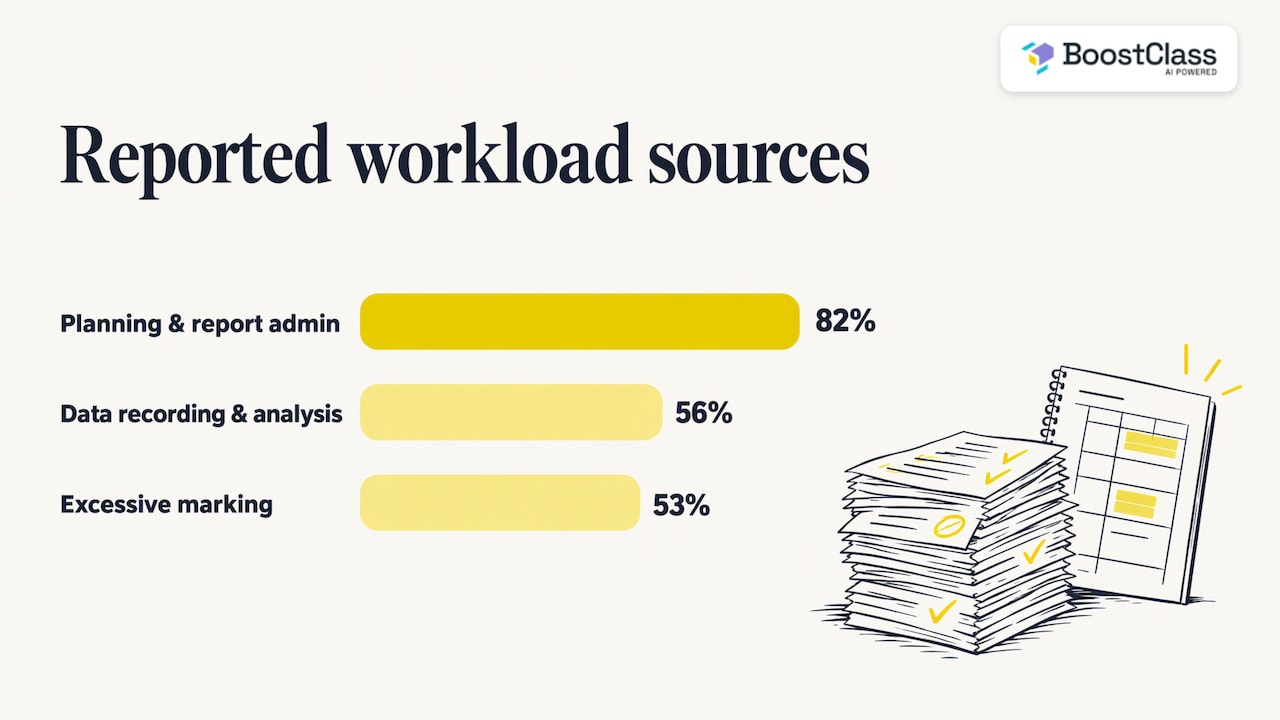
Before fixing workload, find out what it is made of. In the Department for Education’s Workload Challenge consultation in England, 82% of respondents named lesson planning and policies, assessment and reporting administration as the most frequent source of unnecessary and unproductive work. Recording, inputting, monitoring and analysing data came up for 56%, and excessive marking for 53%.
The picture is similar elsewhere. Australia’s teaching standards body reports that most primary and secondary classroom teachers spend at least five hours a week planning lessons, and more than half spend five or more hours on general administration.
Language teaching adds its own layers. A teacher with 25 private or small-group students may need a different warm-up, a different error-correction focus and a different homework set for each of them. Multiply that by evening and weekend classes, and the hours spill into unpaid time quickly.
For a school owner, this is not only a wellbeing issue. Overloaded teachers prepare less, give vaguer feedback and teach more from the coursebook page. Students notice, engagement drops, and retention follows.
Find the work that is avoidable
Not all workload is bad. Planning a lesson around a real student’s needs is the job. The aim is to remove what does not help learning.
The DfE’s workload toolkit suggests an impact graph: plot each task by the workload it creates and its impact on teaching and learning, then amend, refine or stop the tasks that are high workload and low impact. It works just as well for a language school of six teachers as for a large secondary school.
Try it in a 30-minute team meeting:
- List every recurring task: planning, marking homework, writing end-of-term reports, parent or sponsor updates, attendance, level-test analysis, observation write-ups.
- Ask each teacher to estimate weekly hours for each one.
- Score each task’s impact on student progress from 1 to 5, as a group.
- Circle everything with high hours and a score of 2 or below.
In language schools the circled items are usually the same: copying vocabulary lists into new documents, writing near-identical feedback comments, rebuilding last week’s worksheet for one absent student, and compiling progress reports from memory.
Streamline lesson planning without losing quality
Planning is the biggest single lever, and the advice that comes up again and again is: stop planning from scratch. The DfE describes a school that shared departmental resources centrally and gave teachers better schemes of work, with a clear sequence of key knowledge, deliberate practice and a progression model, which cut planning time.
One caution from DfE qualitative research: ready-made resources were not always popular because many teachers wanted to keep planning their own lessons. That matters for language teaching, where a generic worksheet rarely matches the group in front of you. The best approach keeps the teacher’s style and materials and automates the drafting around them.
A planning routine that takes 15 minutes
- Fix the objective first. One sentence: “Students can politely refuse an invitation using I’d love to, but…”.
- Start from the last lesson. Which errors came up? Which structures did half the group avoid?
- Generate, then edit. Ask for a set of activities aimed at that objective and those gaps, then swap, cut and reorder.
- Save what worked. A tagged bank of your own activities, by level and skill, becomes the shared resource the DfE example describes.
For more depth, our guide to AI lesson planning for language teachers walks through this routine with examples at different levels.
How Connected Activities speed this up
BoostClass Connected Activities is built around that routine. A teacher can generate over 20 types of ready-to-use classroom activities, and the lesson can be prepared from three inputs: your teaching objectives, insights from previous classes, and learning gaps the platform has detected in your students. So instead of searching for a gap-fill that roughly fits, you start from what your group actually got wrong last Tuesday.
A worked example: you teach a B1 group on Google Meet. Last lesson, four of six students dropped the third-person -s and avoided the present perfect in speaking tasks. Your objective this week is talking about recent experiences. Connected Activities can draft practice that targets those two gaps in that context, and you adjust the examples to your students’ jobs and interests before class. The preparation becomes a review job rather than a creation job.
Cut the feedback and marking load
Marking and feedback are the second big drain, and the evidence favours doing feedback sooner and closer to the lesson. DfE guidance for school leaders recommends reviewing marking policies, using live class feedback, self-marking tools and feedback codes to avoid lengthy written responses. The DfE’s 2020 toolkit report found that teacher-designed changes significantly reduced time on marking and feedback and lesson planning, while wellbeing improved and pupil outcomes were maintained or improved.
For language teachers, this translates into a few habits:
- Correct in the moment. Note recurring errors during speaking tasks and address them in a two-minute slot at the end, rather than writing individual comments afterwards.
- Use codes. A small set of symbols for tense, word order, article and preposition errors lets students self-correct before you write a word.
- Mark selectively. Choose one or two focus areas per piece of writing and say so in advance.
- Turn feedback into practice. A comment nobody acts on is wasted effort. Follow each lesson with short practice on the student’s own mistakes.
Our teacher guides on real-time feedback for language students and writing feedback with AI cover these in more detail.
BoostClass handles the after-class part. It automatically generates individual student feedback from the lesson, tracks progress, and delivers personalised practice aimed at each learner’s actual mistakes and areas for improvement. It works with Zoom, Microsoft Teams and Google Meet, and it supports in-person teaching as well, so a school running both formats uses one workflow. Students do not need to install anything.
Reduce reporting and administration
The third cluster is data and reports. The DfE’s research on workload found that administration, data tracking, marking and planning are recurring reasons teachers give for being overstretched, and that many coped by working outside school hours or by quietly lowering the quality of what they produced. Neither is a good outcome for a school selling a premium experience.
Practical ways to cut it:
- Enter data once. Pick one place where lesson notes, attendance and progress live, and stop duplicating them.
- Standardise report structure. Our guide to language progress reports shows what to include so that a report takes minutes, not an evening.
- Automate the summary, keep the judgement. Let software compile what happened across lessons, and let the teacher add the human comment.
- Protect lesson time. Small routines, such as the ones in our lesson time management guide, stop classes overrunning and stop preparation ballooning.
With BoostClass, progress tracking and automated performance reports come from the same lesson data that drives feedback and practice, so the report is a by-product of teaching rather than a separate task.
What AI can and cannot take off your plate
The numbers on AI and time saved are encouraging, with conditions. A trial reported by the UK government found that using a general-purpose chatbot for lesson planning and resource creation could save 31% of teachers’ time on planning and administration, around 25 minutes a week. A US survey by the Walton Family Foundation found that weekly AI users save an average of 5.9 hours a week, about twice as much as monthly users, with lesson preparation, worksheets and modifying materials the most common uses.
Two lessons follow. Savings grow with regular use, so a tool that sits inside your routine beats one you open occasionally. And different studies measure different things, so treat any single figure as a range, not a promise.
Keep a human in the loop
AI output needs checking. The EdTech Hub’s 2025 brief notes that AI systems can make errors through faulty data, algorithmic bias or software glitches. The British Council’s guidance for teachers says AI use in assessment, marking and feedback should have human oversight and transparency, that personal information should be removed before using AI, and that learners should be told how AI is used.
A sensible checklist before adopting any AI assistant:
- Does the teacher review activities and feedback before students see them?
- Is it clear to students and parents where AI is involved?
- Is personal data handled in line with your school’s privacy policy?
- Does the tool fit your teaching approach, rather than replace it?
Staff confidence matters too. A short AI training course for staff can help a team build shared habits for using AI at work with proper oversight. If your teachers worry about being replaced, our piece on whether AI will replace language teachers is written for exactly that conversation.
Personalisation and engagement without extra hours
Personalised learning is usually the first thing to go when workload rises. Nobody has time to write a custom exercise for every student, so everyone gets the same homework.
The British Council’s guide for school leaders says AI can support adaptive learning through diagnostic assessment and offer practice and explanations tailored to a learner’s level, as well as instant feedback on grammar and pronunciation with less anxiety for learners. It frames this as equipping learners to study independently, not replacing the teacher.
This is where workload and retention meet. Students who receive practice on their own mistakes feel the course is built for them. Students who feel that tend to stay. You can read more about structuring this in our guide to personalised learning pathways.
The key difference in our approach is the source of the data. BoostClass captures insights from the real class with a real teacher, then generates reports and practice from actual class interactions. Practice is not a generic quiz bank; it traces back to what happened in your lessons.
What this means for school owners
Workload is also a quality issue. If you run a school, three questions matter:
- Preparation: Are teachers building lessons from the last class’s evidence, or from habit?
- Consistency: Does every student get comparable feedback and practice, whoever their teacher is?
- Visibility: Can you see learning outcomes and engagement without chasing teachers for spreadsheets?
BoostClass also analyses teacher performance, with a particular focus on Teacher Talk Time and other metrics, so owners can see how lessons are really being delivered and support teachers with specifics rather than impressions. Used well, this is coaching data, not surveillance: it shows where a teacher is talking more than the students need and where a good habit deserves to be shared.
For a wider view, see how AI is transforming English language centres and our comparison of three AI models for language schools.
A four-week plan to get hours back
Week 1: Audit. Run the impact graph exercise. Choose two tasks to fix, not ten.
Week 2: Planning. Agree an objective-first planning routine. Each teacher builds one week of lessons from last lesson’s gaps and saves the activities that worked.
Week 3: Feedback. Introduce error codes and a two-minute end-of-lesson correction slot. Move written comments to the points that matter most.
Week 4: Review. Ask teachers how many hours they saved and whether students noticed any difference. Keep what worked, drop what did not.
Then repeat with the next two tasks. Small, teacher-led changes are the pattern behind the DfE’s toolkit findings, and they last because the people doing the work chose them.
Our perspective
We built BoostClass because we kept seeing the same pattern: good teachers losing evenings to preparation and reports, while the most valuable information, what students actually said and got wrong in class, disappeared when the lesson ended.
Our view is that workload will not fall by asking teachers to work harder or to lower their standards. It falls when the lesson itself produces the material for what comes next: feedback, practice, progress tracking and the next plan.
That is why we connect preparation, classroom performance and continuous practice into one experience, whether the class is on Zoom, Microsoft Teams, Google Meet or in the room. Teachers keep their style and their materials. We take on the repetitive admin around them.
We are also clear that AI assists and the teacher decides. The teacher knows the student, and the platform is there to give them more time to use that knowledge.
Cesar
Try it in your own classes
If you want to see how much preparation time connected, gap-based activities can save, start with BoostClass Connected Activities. You can generate over 20 types of classroom-ready exercises from your objectives, previous class insights and detected learning gaps, then edit them to suit your group.
Published plans start with Activities at €5 per month. Student Intelligence covers up to 10 students for €19 per month and up to 20 students for €34 per month, and the Student feedback plan covers up to 30 students for €49 per month. See the pricing page for the full details.
You can discover BoostClass or go straight to AI classroom activities and build your next lesson.
FAQ
How can I reduce my workload as a language teacher quickly?
Start with planning and feedback, because they take the most hours. Plan from the last lesson’s errors and a single objective, reuse and tag activities that worked, and correct common mistakes live rather than in writing afterwards. Tools that generate drafts for you to edit can shorten the first step further.
Can AI really reduce lesson planning time?
Yes, with caveats. A UK government-reported trial found time savings of 31% on planning and administration when using AI for lesson plans and resources, and a US survey found regular users save more than occasional ones. The teacher still needs to review everything before it reaches students.
Will reducing workload lower lesson quality?
Not if you remove low-impact tasks rather than lower your standards. The DfE’s 2020 toolkit report found that teacher-designed changes cut time on planning and marking while pupil outcomes were maintained or improved. Focus on what students gain from each task.
Does BoostClass work for in-person classes?
Yes. BoostClass integrates with Zoom, Microsoft Teams and Google Meet, and it also supports in-person teaching. Students do not need to install anything.
Sources
- Workload Challenge: Analysis of teacher consultation responses (DfE, 2015)
- Teacher duties, AITSL
- Prioritise change using impact graphs (DfE)
- Try ideas to manage planning and curriculum workload (DfE)
- Working lives of teachers and leaders (DfE, 2025)
- How to manage change and reduce workload in your school (DfE, 2019)
- Supporting teachers through the school workload reduction toolkit (DfE, 2020)
- The biggest risk is doing nothing: insights from early adopters of AI (GOV.UK)
- The AI Dividend (Walton Family Foundation, 2025)
- How Is AI Upgrading Teachers’ Roles in Low- and Middle-Income Countries (EdTech Hub)
- British Council AI guidelines for teachers
- AI in language learning: lessons for school leaders (British Council)
- AI training course for staff (Votra)
